If you subscribe to a high-tier Google AI plan, such as Google One AI Premium ($20/mo) or Google AI Ultra ($200/mo), you immediately encounter conflicting product boundaries.
The marketing pages present a clean list of benefits: massive cloud storage, Gemini Advanced, Gemini in Workspace, creative studios, YouTube Premium, developer credits, and agentic coding with Jules. But when you actually invite family members to your plan, fire up a terminal agent on Linux, or dispatch background tasks to a GitHub repository, the real-world behavior frequently diverges from developer expectations.
Why didn’t your family members get ad-free YouTube? Why is a supervised child account blocked from Gemini 3 Pro reasoning? Why did your terminal script throw a 429 rate limit error when your account has an advertised 20-fold quota expansion? And how do you route the monthly Google Cloud credits to container workloads without getting surprise bills?
Here is the operational breakdown of how Google AI plans work in practice, where the hidden boundaries lie, and how to configure your developer toolchain to extract maximum value.

Google AI Subscription Tiers at a Glance
Google structures its AI subscription landscape across four tiers, adding an intermediate $99.99/mo Ultra option alongside the flagship $199.99/mo plan, per Google AI plan specifications. All four tiers are compared below. This article primarily focuses on maximizing the $200/mo Google AI Ultra plan. We analyze whether its 20-fold compute expansion, $100 developer credits, 30 TB storage pool, and shared family pool dynamics justify the cost.
| Plan Feature | Free Tier | Google AI Pro | Google AI Ultra 5x | Google AI Ultra 20x (Focus) |
|---|---|---|---|---|
| Monthly Price | $0 / mo | $19.99 / mo (~$20) | $99.99 / mo (~$100) | $199.99 / mo (~$200) |
| Cloud Storage | 15 GB unshared | 5 TB shared family pool | 20 TB shared family pool | 30 TB shared family pool |
| Gemini Compute Quota | Basic Flash / capped | Pro baseline (4x Plus) | 5x Pro limit expansion | 20x Pro limit expansion (Priority access) |
| Google Cloud Developer Credits | None ($0) | $10 / mo credits | $40 / mo credits | $100 / mo Developer credits (offsets Gemini API / VMs) |
| Google Flow Credits | 50 daily credits (basic) | 1,000 credits / mo | 10,000 credits / mo | 25,000 Flow + 30,000 Music / mo |
| Context Window & Uploads | Standard (~32k–128k) | 1 M tokens | 1 M tokens | 1 M tokens (1,500-page doc uploads) |
| Family Group Allocation | None | Storage only (Gemini Pro is Manager-only) | Shared 20 TB storage, single pooled agy meter & Flow | Shared 30 TB storage, single pooled agy meter & Flow (Manager: 300 Jules tasks) |
| NotebookLM Capacity | Up to 50 sources | Up to 300 sources | Up to 600 sources | Up to 600 sources (12-fold) |
| YouTube Premium | None (Ad-supported) | YouTube Premium Lite (Manager only) | YouTube Premium (Manager only) | YouTube Premium (Manager only) |
| Jules Coding Agent | 15 tasks / 24 h (3 concurrent) | 100 tasks / 24 h (15 concurrent) | 150 tasks / 24 h (15 concurrent, priority queue) | 300 tasks / 24 h (60 concurrent) |
The Independent Usage Buckets at a Glance
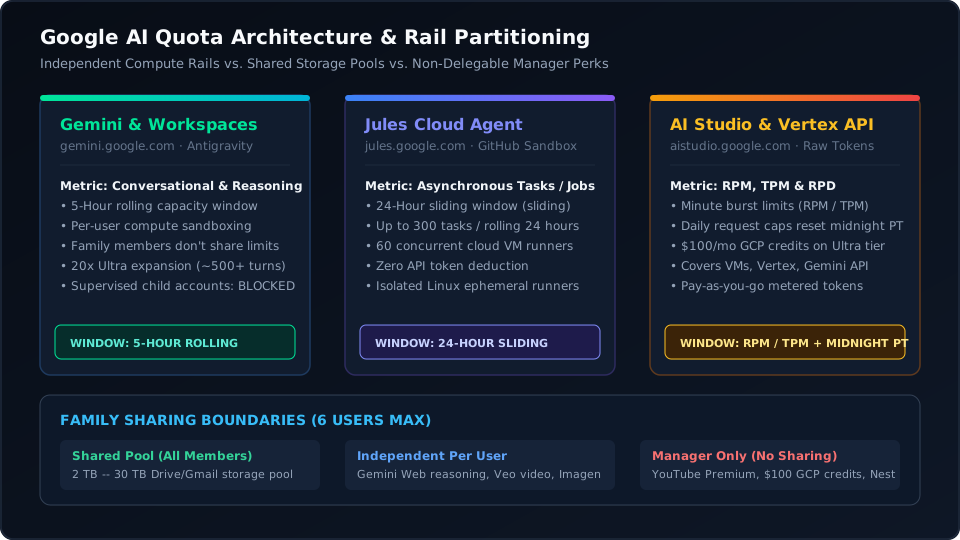
Unlike single-surface subscriptions that route all developer tasks through a single meter, Google AI divides access across distinct, non-competing resource rails. Exhausting your quota in one bucket never throttles the others:
| Usage Bucket | Primary Interfaces & Surfaces | Quota Schedule & Metering | Developer Role & Use Cases | Detailed Section |
|---|---|---|---|---|
| 1. Conversational & Coding Agents (AGY / Web) | Gemini Web (per-user), Antigravity
(agy, shared family meter) |
Rolling 5-hour window (~500 to 600 queries per 5 h on Ultra) | Fast conversational debugging, architecture planning, and multimodal code reasoning | Section 1 & 3 Details |
| 2. Autonomous Cloud VM Sandboxes (Jules) | jules.google.com, GitHub App,
@google/jules CLI |
Rolling 24-hour sliding window: 300 tasks / 60 VMs (Manager) + 100 tasks / 15 VMs each (Family) | Asynchronous repo refactoring, multi-file edits, and running test suites in cloud VMs | Section 3 Jules Guide |
| 3. Developer API & Headless Loops (AI Studio) | aistudio.google.com, raw API
keys, Aider, OpenCode, custom scripts |
RPM / TPM minute caps + midnight PT daily resets; funded by $100 / mo Cloud credits | Headless agent loops, local Git trees, private forges, and zero-exposure workflows | Section 3 AI Studio Guide |
| 4. Semantic Research Workspaces (NotebookLM) | notebooklm.google.com, Gemini
audio overviews, source explorer |
Up to 600 sources per notebook (12-fold expansion over Pro), independent query pools | Grounding full codebases, system ADRs, API specs, and generating audio walk-throughs | Section 4 NotebookLM Guide |
| 5. Developer Cloud Infrastructure (GCP Credits) | Google Cloud Console, Compute Engine, GKE, Vertex AI, Cloud Storage | $100 / mo monthly promotional credit deposited into Google Cloud Billing Account | Offsetting paid AI Studio tokens, hosting continuous CI runners, and running VMs | Section 4 Cloud Credit Guide |
| 6. Creative AI Studio (Google Flow) | flow.google.com, Veo 3.1
video engine, Imagen 4, MusicFX |
Monthly creative credit pools: 1,000 (Pro), 10,000 (Ultra 100), 25,000 Flow + 30,000 Music (Ultra 200) | Cinematic video explainers, UI storyboards, consistent character animations, and audio stems | Section 4 Flow Guide |
BLUF: Capturing the Often-Unused Developer Quotas
Most subscribers treat Google AI Ultra as an expensive chat interface. In practice, this leaves over $200 per month in high-value developer compute completely unused.
The four largest uncaptured quotas and their recovery strategies:
- Jules Asynchronous Coding (300 tasks / 24 h for manager, up
to 800 across family accounts):
- The Waste: Subscribers rarely connect their GitHub repositories. This leaves up to 30 cloud VMs and hundreds of daily autonomous coding sessions idle.
- The Capture: Route maintenance, dependency upgrades, unit test expansion, and mechanical refactors to Jules via GitHub issues.
- Monthly Google Cloud Credits ($100 / mo,
Use-It-or-Lose-It):
- The Waste: Promotional credits expire every 30 days without rollover, forfeiting $1,200 in annual enterprise infrastructure.
- The Capture: Route credits to Vertex AI endpoints, multimodal embedding pipelines, or test containers backed by a strict $100 budget cap.
- Google AI Studio Developer Rails:
- The Waste: Developers stay confined to web chat limits while AI Studio offers elevated rate limits, 1-million-token context exploration, and system prompt tuning.
- The Capture: Migrate heavy document parsing, batch data extraction, and structured JSON generation into AI Studio instead of the consumer Gemini web chat.
- Google Flow Cinematic Video (Veo 3.1, up to 25,000 credits /
mo):
- The Waste: Engineers pay $30 to $95 / mo for third-party video tools like Runway or Kling without realizing Google bundles Veo 3.1 directly into their subscription.
- The Capture: Generate video facades, technical explainer
animations, and UI motion mockups at
flow.google.comusing native credit allowances.
The Generous Google Free Tier: Zero-Cost Developer Intelligence
Before purchasing a paid subscription, builders should evaluate Google’s free developer ecosystem. For small projects, quick experiments, and personal automation loops, Google provides extensive compute without requiring a credit card:
- Google AI Studio Developer API:
- Gemini Flash and Flash-Lite: Developers receive 15 Requests Per Minute (RPM), 1 Million Tokens Per Minute (TPM), and 1,500 Requests Per Day (RPD) free.
- Gemini Pro Reasoning: Free accounts receive up to 2 RPM, 32,000 TPM, and 50 RPD for deep reasoning queries.
- Massive Context Windows: Full 1-million-token context windows are available on free API keys, including native Google Search grounding.
- The Data Privacy Nuance: Free AI Studio prompts and responses may be reviewed by human annotators to train Google models. For open-source repos, public data scraping, and personal scripting, this delivers extraordinary zero-cost utility. For proprietary corporate code, enable pay-as-you-go billing in the Google Cloud Console to disable model training.
- Autonomous Cloud VMs with Jules:
- Free GitHub accounts receive 15 background coding agent tasks every rolling 24 hours.
- Jules spins up isolated Linux virtual machines, runs tests, fixes bugs, and opens Pull Requests without consuming local CPU or paid tokens.
- Semantic Research in NotebookLM:
- Free users can upload up to 50 source documents per notebook, with each source containing up to 500,000 words.
- Includes conversational Audio Overviews – generating realistic two-host podcasts that explain complex technical documents at zero cost.
- Interactive Compute in Google Colab:
- Complimentary hosted Jupyter notebooks with free access to Nvidia T4 GPUs and TPUs for machine learning experiments and Python workflows.
- Creative Experimentation in Google Flow:
- Provides 50 daily credits for basic image generation with Nano Banana Lite, enabling developers to test interface tools and prompt concepts for free.
First, the fact check
Before looking at specific features, we should address six common assumptions developers and families make when upgrading to Google AI tiers:
-
✗ Family sharing provides
independent developer agent compute pools. Marketing pages
suggest each family member receives their own AI compute allocation. In
reality, Antigravity (
agy) enforces a single shared live usage meter across the entire family group. Empirical testing with two accounts inagyconfirms that turns run by a family member subtract directly from the primary manager’s usage meter in real time. While web chat histories remain private and Jules provides dedicated task quotas, terminal agent compute is zero-sum. Adding a family member does not multiply agent bandwidth; it cannibalizes your personal quota. - ✗ Family sharing includes bundled YouTube Premium. Even on the $200 / mo Ultra plan that includes YouTube Premium at no added charge, YouTube benefits are locked strictly to the primary plan manager’s account. Subaccounts and family members continue to see ads unless enrolled in a standalone YouTube Family Plan.
- ✗ Google AI Pro ($19.99 / mo) gives every family member full Gemini Pro. On the entry Pro tier, Gemini Advanced and Pro model access are strictly manager-only. Family group members share only the 5 TB cloud storage pool. Family members do not get independent Pro subscriptions. On Ultra tiers where AI access is shared, all members draw from a single pooled subscription quota rather than receiving independent multipliers.
- ✗ Jules and Google AI Studio pull from the same API token quota. Jules and Google AI Studio operate on two completely isolated infrastructure rails. Jules tracks subscription-managed tasks, concurrent repo sandboxes, and PR dispatches. AI Studio tracks requests per minute (RPM) and tokens per minute (TPM) tied to Google Cloud project quotas. Exhausting capacity in one never affects the other.
- ~ Google Cloud developer credits cover all billing charges. The monthly developer credits (e.g. $100 / mo on Ultra) cover core infrastructure – Compute Engine Linux VMs, GKE clusters, Vertex AI endpoints, Cloud Storage, and paid Gemini API tokens in AI Studio. However, they strictly exclude third-party marketplace software charges and domain registrations.
- ✗ Google Flow creative credits multiply across family members. While family members access Gemini web chat through separate accounts, Google Flow credits draw from a single pooled allocation. Family members using Google Flow consume from the primary subscriber’s monthly credit pool (e.g. 25,000 credits on Ultra), meaning heavy video generation by one member depletes the shared monthly balance.
1. The Family Sharing Architecture: Shared Pools vs. Independent Ceilings
Google allows plan managers to share their subscription with up to 5
additional family members via Google Family Groups
(families.google.com). However, the system divides benefits
into two distinct operational models:
Per-User Accounts and Sandboxes
These features provide individual accounts, isolated histories, and dedicated task allocations:
- Gemini Web and Advanced Models: On Google AI Pro
($19.99 / mo), Gemini Advanced and Pro models are manager-only, while
family members share cloud storage. On Ultra tiers ($100 / mo and $200 /
mo), each adult family member accesses Gemini on the web through their
own Google identity. Prompts, history, custom instructions, and context
windows remain private. However, we do not have empirical data
confirming whether Google enforces completely independent web compute
ceilings per user or pools them under the hood during peak load. What we
have empirically verified is the terminal agent behavior: Antigravity
(
agy) strictly shares a single live meter across the entire family. - Autonomous Coding Agents (Jules): Family members inherit independent Jules allocations. The manager receives 300 tasks / 24 h and 60 concurrent VMs. Each adult member receives 100 tasks / 24 h and 15 concurrent VMs, compared to 15 tasks on free accounts. Aggregated across six accounts, the group commands up to 800 tasks every 24 hours. Usage remains strictly isolated: a member running background jobs never drains the manager’s 300-task quota.
- Media and Creative Generation: Daily generation allotments for generative media (Veo video animations, Imagen high-resolution generation, and Google Photos Remix) reset individually on each user profile.
- Gemini in Workspace Apps: Each member gets personal side-panel assistance inside Gmail, Google Docs, Sheets, and Slides linked to their individual Google account.
Global Shared Pools
These resources draw from a single shared reservoir across all group members:
- Cloud Storage Bucket: The 5 TB, 20 TB, or 30 TB storage pool is shared collectively across Gmail, Google Drive, and Google Photos. If one member stores large dataset backups or video files consuming 15 TB, that capacity is unavailable to everyone else. Files remain private to each account, but volume consumption is shared.
- Google Antigravity Workspaces and Shared Live Usage Meter
(
agy): While marketing copy references shared access, the technical reality is severe: all family members share the exact same live usage meter in Antigravity (agy). We empirically verified this across two active accounts enrolled in the same Google One family group. When a secondary account executes coding turns or agentic loops inagy, the usage meter decreases identically and simultaneously for the primary plan manager. Compute consumption by an invited family member directly subtracts from your personal development bandwidth in real time. There is zero per-user isolation or separate subaccount bucket in Antigravity. If a family member dispatches an automated refactoring script, your own terminal sessions will face throttle limits without you executing a single turn. - Google Flow and Studio Credits: Discretionary creative credits (such as monthly Flow credits for generative projects) draw from the master account pool.
How to Configure Google Family Group Sharing
Sharing subscription perks requires setting up a Google Family Group:
1. Create the Family Group: Visit
families.google.com logged into the primary paying account
and select Create Family Group. 2. Invite
Members: Enter up to five personal @gmail.com
addresses. Managed Google Workspace and school accounts cannot join. 3.
Accept Invitations: Each member confirms the invitation
link received via email. 4. Enable Subscription
Sharing: In one.google.com, navigate to
Settings > Manage family settings and toggle
Share Google One with family.
Group Constraints & Boundaries:
- Country Match: All members’ Google Play and Google Payments profiles must match the family manager’s country.
- Switching Limit: Google restricts users to switching family groups once every 12 months.
- Age Verification: Members must be 18 or older to access advanced reasoning, Antigravity, and Jules. Supervised child accounts cannot access agentic coding tools.
2. Manager-Only Perks: What Fails to Share
Several of the most valuable bundled perks remain tied exclusively to the primary billing account and cannot be delegated:
- YouTube Premium / YouTube Premium Lite: Bundled ad-free playback, offline downloads, and YouTube Music access remain strictly bound to the manager. Family members receive no YouTube perks.
- Monthly Google Cloud Developer Credits: Promotional credits ($100/mo) deposit solely into the manager’s Google Cloud Billing Account. Sharing Workaround: To share these credits, add family members’ Google accounts as IAM principals (Editor or Vertex AI User) in the GCP Console. Any AI Studio keys they generate in that project will draw against the credit pool.
- Google Home Premium and Nest History: Cloud video event recording and home automation Gemini enhancements do not extend to secondary family accounts.
- Google Store Cash Back: Hardware purchase rebates and promotional store credits accrue exclusively to the primary purchaser.
3. Jules vs. Google AI Studio: Two Different Engines
For software engineers, understanding the operational separation between Jules and Google AI Studio is critical for designing reliable dev workflows.
+-------------------------------------------------------------------------+
|                              GOOGLE AI                                  |
+------------------------------------+------------------------------------+
|               JULES                |          GOOGLE AI STUDIO          |
|    (jules.google.com)              |       (aistudio.google.com)        |
+------------------------------------+------------------------------------+
| - Asynchronous Repo Agent          | - Raw Model API Access             |
| - Isolated Cloud Sandbox / VM      | - Direct Token Streaming           |
| - Governed by AGENTS.md            | - Governed by Cloud Quotas         |
| - Output: Git Branch & PR          | - Output: Direct API Responses     |
| - Quota: Concurrent Tasks          | - Quota: RPM / TPM / RPD           |
| - Zero API Token Billing           | - Pay-As-You-Go / GCP Credits      |
+------------------------------------+------------------------------------+
Jules: Asynchronous Repository Automation
Jules (jules.google.com) is an autonomous coding agent.
Instead of running inline inside an editor, Jules operates
asynchronously in an isolated cloud sandbox:
- Repository Connection: You link your GitHub account and grant repository access. (Jules is currently hard-coupled to GitHub via the Google Labs GitHub App; it does not support direct generic Git URLs or self-hosted webhooks).
- Context Ingestion (
AGENTS.md): Jules inspects up to 30,000 lines of codebase context. It reads your project’sAGENTS.mdto discover build commands, test suites (such aspytest,npm test, ormake validate-content), and linting rules. - Execution: Jules plans changes, creates a feature branch, modifies files, runs your test suites inside its virtual machine to verify correctness, and opens a GitHub Pull Request with a visual diff and test summary.
- Quota Metric: Jules consumption is measured in concurrent tasks and active background jobs, not token counts. On the Ultra tier, you receive priority task queues and higher concurrency.
Google AI Studio: Raw Token Streaming and Terminal Agents
Google AI Studio (aistudio.google.com) is a developer
portal for direct API integration:
Direct API Access: Generate API keys bound to a Google Cloud Project to call Gemini 3 Pro and Gemini 3 Flash models directly.
Terminal and Local CLI Integration: You export the API key in your Linux terminal to power agentic harnesses:
export GEMINI_API_KEY="AIzaSy..."This key powers local developer agents such as Antigravity, Aider, OpenCode, LiteLLM, or custom Python pipelines.
Quota Metric: AI Studio requests are tracked purely by RPM (Requests Per Minute), TPM (Tokens Per Minute), and RPD (Requests Per Day). Under the free tier, Flash models provide up to 15 RPM, 1 Million TPM, and 1,500 RPD, while Pro models deliver 2 RPM, 32,000 TPM, and 50 RPD.
Because the systems run on independent rails, running an automated script in AI Studio that exhausts your RPM limit will never stop Jules from continuing its repository tasks.
The Multi-Rail Quota and Reset Schedules
Neither Jules nor Google AI Studio uses the consumer Gemini app’s 5-hour rolling window. The platform segments compute across distinct schedules:
- Gemini Web Chat (Consumer UI):
- Metric: Conversational turns and standard exploratory questions.
- Reset Window: Rolling 5-hour window.
- Ultra Capacity: 20-fold Pro headroom documented in Google AI plan specs (~500+ queries per 5-hour cycle before temporary Flash fallback).
- Antigravity CLI and IDE (
agy):- Metric: Autonomous coding agent turns, multi-file edits, and tool invocations.
- Reset Window: Developer agent compute pool resetting independently of consumer chat.
- Ultra Capacity: Priority agent concurrency and high-throughput reasoning tokens.
- Jules (
jules.google.com):- Metric: Asynchronous tasks and active concurrency.
- Reset Window: Rolling 24-hour sliding window (not a fixed midnight reset). If you launch 20 tasks at 2:00 PM, those 20 task slots open back up at 2:00 PM the following day.
- Ultra Capacity: Up to 300 tasks per rolling 24 hours and 60 concurrent jobs in flight simultaneously (compared to 15 daily tasks on free accounts).
- Google AI Studio
(
aistudio.google.com):- Metric: Tokens and raw API requests.
- Reset Window: Short-burst RPM/TPM minute caps + Daily RPD resetting at midnight Pacific Time (PT) + monthly calendar billing cycle on Google Cloud.
- Ultra Capacity: Standard developer tier rate limits funded by $100/mo Cloud Developer Credits, or 1,500 daily requests on the free tier.
Antigravity CLI/IDE vs. Gemini Web Chat: Isolated Infrastructure Rails
Nobody subscribes to a $200/mo Ultra tier simply to chat in a browser window. The core economic return lives in developer terminal agents, Jules cloud repository tasks, and cloud infrastructure.
Critically, Gemini web chat and Antigravity CLI/IDE run on completely separate infrastructure rails with zero cross-talk throttling:
- Independent Rate Limiting: Hitting the 5-hour ceiling in the consumer Gemini web chat will never lock you out of Antigravity terminal agent sessions.
- Agent Loop Protection: Running an intensive, multi-step refactoring loop or test generation harness in Antigravity will not exhaust your web chat window or trigger fallback to Flash on the web.
- Operational Rule: Treat web chat as an exploratory scratchpad for rapid questions. Route all disciplined code generation, multi-file edits, and git commands directly through Antigravity CLI and IDE workspaces.
Deep Think and Deep Research: Multi-Avenue Quota Breakdown
Both Deep Think (extended test-time reasoning compute) and Deep Research (autonomous multi-step web investigation) feature compartmentalized quotas across separate product avenues.
Deep Think: Four Independent Reasoning Avenues
Deep Think allocates internal test-time compute to verify algorithms, prove code properties, and solve complex system logic:
- Antigravity CLI and IDE (
agy): Controlled via reasoning effort flags (low,medium,high). Consumes developer agent compute rails without touching consumer web chat limits. However, this bucket is shared collectively across all family members usingagy. - Gemini Web Interface: Activated via the Deep Think toggle on Gemini 3 Pro. Governed by the consumer 5-hour rolling compute window (~200+ turns per window on Ultra before falling back to Flash).
- Google AI Studio & Vertex AI API: Parametrized
via
thinkingConfig(allocating a thinking token budget from 0 to 64,000 tokens). Governed by project RPM and TPM limits, isolated from consumer accounts. - Family Web Chat vs. Shared agy Meter: On the web,
members have distinct logins and chat sessions, though Google does not
document whether high-load web thinking quotas are partitioned per seat
or throttled against the master plan. Inside Antigravity
(
agy), however, our empirical tests confirmed that reasoning tokens consume from a single shared family meter, directly decrementing the plan manager’s allowance.
Deep Research: Four Distinct Investigation Tracks
Deep Research deploys autonomous browsing agents that read dozens of technical papers, query search indices, and compile structured reports:
- Gemini Web Deep Research: Web-grounded report synthesis generating 10-to-20-page structured dossiers. Metered as a discrete monthly report allotment (50 to 100 reports per month on top tiers).
- Antigravity Research Subagents: Terminal research
subagents crawling local repositories, external documentation, and web
sources. Executes against your Antigravity agent quota, which is pooled
across family members in
agy. - NotebookLM Workspace Grounding: Deep synthesis across uploaded source documents (up to 600 sources on Ultra, 500,000 words per source). Runs on independent Workspace rails with zero drawdown against Gemini chat or Antigravity limits.
- Family Member Web Allowances: On the web, individual member accounts can trigger Deep Research reports independently. In Antigravity, research subagents draw against the shared family agent meter.
Connecting Non-GitHub and Self-Hosted Forges (GitLab, Gitea, Forgejo, Bitbucket) to Jules
Because Jules currently couples directly to GitHub via the Google Labs GitHub App, engineering teams on alternative platforms face an immediate integration barrier. This affects organizations running GitLab as well as teams using lightweight engines like Forgejo and Gitea, or enterprise platforms like Bitbucket Data Center. Jules offers no direct generic Git-over-SSH remotes or webhooks for these environments.
To bridge this gap without abandoning your primary forge, two operational patterns are used in practice:
Pattern A: The Two-Way Push Mirror Bridge
If organizational security policies permit sanitized code passing
through an intermediary private GitHub account: 1. Create a private
GitHub mirror repository and install the Jules GitHub App. 2. Configure
your primary forge’s native push mirroring – such as GitLab’s Repository
Mirroring
(Settings > Repository > Mirroring repositories), or
equivalent push mirroring in Forgejo, Gitea, and Bitbucket – to
replicate designated feature branches to the private GitHub repository.
3. Dispatch tasks to Jules against the GitHub mirror. 4. Once Jules
completes its execution, pull the resulting PR branch or commit back
into your primary forge via Git CLI or webhook. This offloads
compute-heavy refactoring, test drafting, and lint repairs to Google’s
cloud VMs while maintaining GitLab or your internal forge as the
authoritative source of truth.
Pattern B: Local Headless Agents via AI Studio Key (Zero External Exposure)
If code cannot touch external third-party cloud infrastructure due to
air-gapped networks, export controls, or strict data residency mandates:
1. Generate a paid Gemini API key in Google AI Studio (funded by your
$100/mo monthly Cloud credits). 2. Run an open-source terminal agent
(such as Aider, OpenCode, Antigravity, or custom Python scripts) locally
against your local clone, regardless of whether your origin is GitLab,
Gitea, Forgejo, Bitbucket, or a bare SSH server:
bash pip install aider-chat export GEMINI_API_KEY="your-ai-studio-key" aider --model gemini/gemini-2.5-pro --message "Implement structured error handling in auth.go" git push origin <feature-branch>
3. Open the Merge Request (MR in GitLab) or Pull Request natively inside
your private forge’s web UI or CLI. This keeps your entire source tree
within your perimeter while putting your monthly developer credit pool
to active use.
Can Jules Use
Repository Skills (.agents/skills/)?
For engineering teams that maintain structured skill directories
(such as Prompt Swap packages under .agents/skills/ or
.claude/skills/), Jules can leverage them, but with
specific architectural constraints:
As Prompt and Policy Directives (Yes): Because skills are committed directly into git as plain Markdown specifications (
SKILL.md), Jules has full filesystem access to them inside its ephemeral VM. When directed byAGENTS.mdor a task prompt, Jules reads the skill file, parses the heuristics, and strictly applies those rules to its code synthesis.As Deterministic Verification Scripts (Yes): When a skill bundles runnable linters (such as Rust validation gates,
slopstop check, ormake validate-content), Jules runs them inside its VM loop to verify diffs before opening a PR.As Dynamic MCP Servers or Workstation Binaries: Jules supports a curated set of cloud-hosted MCP (Model Context Protocol) servers (such as Linear, Supabase, Neon, and Tinybird) configured via service connections in Jules Settings. However, it runs in a closed cloud VM sandbox and cannot communicate with local MCP servers on your workstation or run local package managers like
pswdirectly. Skills and custom scripts must be materialized inside the repo.Managing the 30,000-Line Context Budget: Jules indexes approximately 30,000 lines of codebase context on launch. Inlining dozens of comprehensive skills into
AGENTS.mddirectly will blow past this ceiling. The proven pattern is an on-demand skill routing table inAGENTS.md:## Specialized Domain Skills (Read on Demand) - Editorial & prose style: read `.agents/skills/copy-editing/SKILL.md` - Pain-first SEO planning: read `.agents/skills/pain-first-content-strategy/SKILL.md` - JSON-LD & entity schema: read `.agents/skills/schema-markup/SKILL.md`This instructs Jules to load the detailed skill instructions only when working on tasks that explicitly touch those domains.
Inside the Jules Cloud VMs: What Works (and What Times Out)
When Jules begins a task, Google provisions an ephemeral, isolated
Linux virtual machine with approximately 20 GB disk space: - VM
Lifecycle: Boots, pulls your git branch, installs runtime
dependencies (npm, pip, cargo,
go), plans and edits code, runs validation test scripts,
pushes a branch or PR, and is immediately destroyed. - Execution
Privileges: VMs have outbound network egress to fetch public
package dependencies. However, you do not get interactive SSH
access.
Is Jules Suitable for Mutation Testing?
- Running Raw Mutation Suites (No): Mutation testing frameworks (such as Stryker, mutmut, or cargo-mutants) generate hundreds or thousands of code mutants and execute the full test suite against each one. Because Jules VMs are tuned for fast CI validation and agent reasoning (typically concluding in 10-20 minutes), running large brute-force mutation suites risks hitting wall-clock execution timeouts. In addition, Google provides fixed vCPU and RAM allocations without custom instance sizing.
- Killing Surviving Mutants (Yes): The high-leverage workflow is to run mutation testing on your local workstation or dedicated CI runner, collect the surviving mutants, and hand the diagnostic report to Jules as a discrete task: > “Here is our mutation test report for pkg/auth. Mutant #14 (flipped conditional on line 82) and Mutant #19 (omitted error check on line 114) survived. Write targeted unit tests in auth_test.go that kill both mutants without breaking existing test suites.” Jules will write the tests, verify they compile and pass, and open a PR.
What Counts as a “Task” in Jules?
- 1 Dispatch = 1 Task: Entering a prompt and clicking Run (or executing via CLI) consumes 1 task slot.
- In-Flight Iterations: Providing feedback during active review before finalizing the run (such as asking Jules to update test mocks) counts within the same task lifecycle.
- Outcome Independence: Whether Jules produces a clean passing PR or aborts on an unresolvable build loop, the compute run is counted against your 24-hour allocation once concluded.
- Suggested Tasks: Approving automated repo recommendations (such as dependency updates or TODO fixes) consumes 1 task each.
Operating via the Jules
CLI (@google/jules)
Developers can control Jules directly from a Linux terminal rather than the web UI:
Installation and Auth:
npm install -g @google/jules
jules login
Dispatching Tasks: Inside a local checkout of a connected GitHub repository, Jules detects the remote automatically:
jules remote new --session "Refactor worker pool to use context cancellation"Local Patch Ingestion (
jules remote pull): The most powerful feature of the CLI is bypassing full GitHub PR merges. You can pull work-in-progress patches directly into your local working tree to inspect, test, or build locally:jules remote pull --session <session-id>Teams maintaining repositories on GitLab, Forgejo, or Bitbucket can bridge to Jules cleanly. Push feature branches to your private GitHub mirror, dispatch Jules via CLI, and pull the diff locally to verify before merging upstream.
Four Ways to Assign Work to Jules
Engineering teams feed repository tasks to Jules through four
separate channels: 1. GitHub Issue Listener (jules
label): Add the label jules to any issue on your
connected repository. The Jules GitHub App intercepts the webhook,
parses the issue context, and spins up a cloud VM task automatically. 2.
Terminal CLI Dispatch (@google/jules):
Execute jules remote new --session "..." directly inside a
local git clone to launch tasks without touching a browser. 3.
The Jules Web Dashboard
(jules.google.com): Select a repository, enter an
actionable prompt, review the proposed execution steps, and approve the
run. 4. Scheduled Recurring Cron Jobs: Define automated
tasks (such as weekly dependency audits, security updates, and test
validation runs) that execute on a recurring schedule.
How Jules Plans and Determines Tasks
Once dispatched, Jules applies a structured two-model planning loop
before modifying files: - AGENTS.md and Repository
Context: Jules parses root configuration files
(AGENTS.md, README.md, package manifests) to
discover your build system, test suites, and style conventions. -
The Two-Model Planning Phase: An advanced Gemini Pro
model evaluates the repository index and drafts a step-by-step execution
plan. It identifies exact files requiring edits and maps out
verification commands (such as pytest,
npm test, or make validate-content). -
Autonomous Backlog Scanning (Suggested Tasks): When
idle, Jules scans repositories for explicit TODO,
FIXME, or outdated dependencies, surfacing them as
suggested tasks in the web dashboard for one-click approval. -
Best Practice for High Yield: Maintain green CI
baselines and specify clear acceptance criteria. Jules relies on your
existing test suites to self-correct during VM execution loops.
4. Maximizing the $200/mo Google AI Ultra Tier
The $199.99/month Google AI Ultra plan, providing a 20-fold quota expansion over standard Pro tiers, supports compute-heavy agentic development, large codebase analysis, and deep technical synthesis.
The Ultra Choice: $99.99/mo vs. $199.99/mo Tier Analysis
Google offers two distinct Ultra configurations: - The $99.99/mo Ultra Plan: Offers a five-fold expansion over Pro compute quotas, 20 TB shared cloud storage, 10,000 monthly Google Flow creative credits, and NotebookLM capacity raised to 100 sources. It suits solo developers needing substantial token throughput without heavy infrastructure overhead. - The $199.99/mo Ultra Plan: Delivers a 20-fold expansion documented in Google AI plan specifications (~500 to 600 queries per 5-hour rolling window). It includes 30 TB shared storage, 25,000 Flow credits, 600-source NotebookLM workspaces, priority Jules queues, and a $100 monthly Google Cloud developer credit.
The Composite ROI Math: Why the $200 Tier Beats Solo Add-Ons
For active engineering teams, the flagship $199.99/mo plan delivers immediate positive unit economics when evaluating its bundled components against standalone retail pricing: - $100 Monthly Google Cloud Credit: Directly reimburses infrastructure spend on Vertex AI endpoints, Google Kubernetes Engine clusters, Compute Engine VMs, or paid AI Studio token surges. This cuts the effective plan price in half to $99.99. - 30 TB Shared Cloud Storage Pool ($150 Retail Value): Standalone 30 TB Google One storage retails at $149.99 per month. For engineering setups managing local model weights, dataset archives, and media assets across family members, the storage alone exceeds the net plan cost. - Google Flow Creative Studio ($40–$95 Standalone Retail Value): Bundling Veo 3.1 cinematic video (25,000 credits / mo) and MusicFX audio synthesis (30,000 credits / mo) eliminates standalone subscriptions to Runway, Kling, or Suno. - YouTube Premium Bundled ($13.99–$15.99 Retail Value): Full YouTube Premium (ad-free streaming and YouTube Music) is included directly on the primary plan manager’s account. - Family Group Compute: On Ultra tiers, up to five family members receive consumer web chat access and dedicated Jules quotas alongside shared storage and a single pooled Antigravity usage meter.
Aggregating $100 in cloud credit, $150 in storage, $40 in creative media, and $15.99 in YouTube perks delivers over $305 in baseline monthly utility. This value accrues before factoring in elevated Gemini reasoning limits or Jules agent virtualization.
To fully capitalize on the plan, developers should leverage five key operational capabilities:
1. 1,500-Page Document Ingest and 1 M Token Context
Ultra expands single-file upload limits to 1,500 pages while maintaining full 1-million-token context windows in the primary web interface. You can upload entire specification suites, architectural blueprints, or decades of regulatory RFCs for semantic search and synthesis without preprocessing or chunking.
2. High-Capacity NotebookLM Workspaces
Standard tiers cap NotebookLM workspaces at 50 source documents (expanding to 300 on Pro). The Ultra tier expands this ceiling to 600 sources per notebook. This enables developers to ground an entire software ecosystem: - Full repository markdown documentation - Historical git commit histories and architecture decision records (ADRs) - Upstream third-party API specifications - System architecture diagrams and deployment manifests
The resulting notebook acts as a fully grounded semantic reference that answers architectural queries without hallucination.
3. Automated Browser Workflows (Gemini Spark)
Signed-in Chrome sessions in supported regions unlock automated multi-step browser tasks. Gemini can navigate authenticated dashboards, query operational metrics, parse vendor interfaces, and automate repetitive web administrative workflows without custom Puppeteer scripts.
4. Directing the $100/mo Google Cloud Credits
Ultra subscribers receive $100 per month in promotional Google Cloud credits via the Google Developer Program.
How to Activate:
- Navigate to the Google Developer Program Dashboard
(
developers.google.com/profile). - Select the Benefits tab and locate the monthly Google Cloud credit allotment.
- Select your active Google Cloud Billing Account and click Apply.
Eligible Workloads:
- Paid AI Studio Token Ingestion: When your terminal agents exceed free-tier rate limits, paid Gemini 3 Pro requests consume from this $100 pool before charging your credit card.
- Compute Engine Linux VMs: Host headless agent loops, continuous test runners, or compilation servers.
- Google Kubernetes Engine (GKE): Deploy containerized backend microservices and development preview clusters.
- Vertex AI Endpoints and Model Garden: Run specialized open-weights models and private fine-tuning.
- Cloud Storage: Store large training datasets, build artifacts, and image backups.
Ineligible Workloads:
- Third-party software licenses purchased through Google Cloud Marketplace.
- Domain registrations and DNS renewals via Cloud Domains.
- Extra consumer Google One storage or standalone media credit add-on packs.
5. Google Flow: The Cinematic AI Creative Studio (Veo 3.1, Imagen, and MusicFX)
A major competitive advantage over OpenAI and Anthropic is Google’s integrated multimedia pipeline. While ChatGPT and Claude remain strictly text-and-code environments, Google bundles its flagship generative video, image, and audio engines directly into the subscription via Google Flow (flow.google.com).
What Is Google Flow?
Developed by Google DeepMind, Google Flow is a unified AI creative studio designed for filmmakers, designers, and software builders. It integrates Google’s most powerful media generation models into a single timeline and asset-management workspace:
- Veo 3.1 Cinematic Video Generation: Generates photorealistic, high-definition 8-second video clips complete with native synchronized audio. Unlike prompt-and-pray generators, Flow features advanced camera trajectory controls, depth panning, and motion intensity sliders.
- Narrative Character and Object Consistency: A longstanding hurdle in AI video is visual drift between cuts. Flow allows creators to lock character identities, props, and environments across sequential prompt scenes, making it feasible to build coherent technical explainers or product demos.
- Nano Banana and Imagen 4: Delivers high-fidelity image rendering, prompt expansion powered by Gemini Omni Flash, style transfers, and precision inpainting for UI mockups and article hero assets.
- MusicFX Audio Synthesis (DeepMind Lyria): Generates full instrumental tracks, background soundscapes, and looping audio stems with direct BPM and key signatures.
- Google Workspace Sketch & Generative Canvas: In Google Docs, Slides, and Workspace sidebars, subscribers access generative canvas tools. Engineers can generate visual system architecture diagrams, user interface sketches, mind maps, and interactive wireframes directly alongside document text.
The Flow Pricing and Credit Structure
Google Flow does not require a standalone subscription. Instead, access and monthly generation limits are directly unlocked by your Google AI tier as detailed in Google Flow pricing specifications:
- Free Tier: Grants 50 daily credits for basic image generation using Nano Banana Lite, allowing users to experiment with interface tools.
- Google AI Pro ($19.99 / mo): Provides 1,000 monthly creative credits, unlocking standard Veo video generation and priority image processing.
- Google AI Ultra ($99.99 / mo): Expands monthly allowances to 10,000 creative credits.
- Google AI Ultra ($199.99 / mo): Delivers a massive creative reservoir of 25,000 Flow video and image credits plus 30,000 dedicated Flow Music credits each month.
How Credits Burn in Practice
Flow operates on a tiered consumption model based on generation complexity: - Fast Generations (~10 credits on Ultra): Ideal for rapid visual ideation, rough scene drafts, and concept exploration (20 credits for non-Ultra users). - Quality Generations (~100 credits): Renders high-bitrate, full-resolution cinematic video clips with native audio.
On the flagship $199.99 / mo Ultra tier, 25,000 monthly credits yield up to 250 full-quality Veo cinematic video clips or up to 2,500 fast concept iterations. If a production studio depletes its allotment, Google allows Pro and Ultra subscribers to purchase à la carte AI credit top-ups without changing their base plan.
Developer and Content Economics
For software engineering teams building documentation, marketing assets, or tutorial videos, Google Flow delivers immense financial leverage: - Eliminating External Tool Sprawl: Standalone video subscriptions (such as Runway Gen-3, Kling, or Luma Dream Machine) cost $30 to $95 / mo. Dedicated audio tools (like Suno or Udio) cost $10 to $30 / mo. - Bundled Value: Google Flow consolidates these tools directly into your Google AI subscription, providing $40 to $125 / mo in creative media value with zero additional subscriptions.
Terminal Image Scripting via the Antigravity Harness
A common assumption among developers is that Google’s creative generation tools are strictly confined to web browsers or consumer interfaces.
While undocumented in standard consumer Google One manuals,
developers can drive Gemini image generation directly from the terminal
and IDE using the Antigravity (agy) agent harness. By
coupling project credentials or subscription profiles to the harness,
coding agents can batch-produce UI components, system diagrams, and
storyboard keyframes programmatically without opening a browser window
or leaving the shell.
6. Production Linux CLI Configuration
When running agentic coding loops on Linux workstations, configure budget safety gates to prevent unexpected charges if an agent enters an infinite retry cycle.
In your Google One / AI Studio billing settings: 1. Set the overage
policy to “Never charge overages” or set a strict
monthly budget alert at $100. 2. In your local development profile,
isolate project credentials:
bash # ~/.bashrc or project .env export GEMINI_API_KEY="AIzaSy..." export GEMINI_MODEL="gemini-2.5-pro" # Fail closed if token limit approached export AGENT_MAX_TURNS=25
7. Plan Limits, Resource Boundaries, and Exhaustion Behaviors
Understanding how each resource rail behaves when exhausted allows developers to engineer resilient workflows without unexpected lockouts:
| Resource & Feature | Google AI Ultra ($200 / mo) Quota | Behavior When Allocation Is Exhausted |
|---|---|---|
| Model Usage Limits (Gemini 3 Pro) | 20-fold Pro limit (~500 to 600 heavy queries per rolling 5 h) | Automatically falls back to Flash / Flash-Lite models until your 5-hour rolling window resets, or you can toggle paid overage credits. |
Antigravity Developer Quota
(agy) |
Priority agent concurrency and high-throughput reasoning tokens | Pooled across family group on a single live usage meter. Subaccounts directly subtract from manager balance; throttles to lower velocity when depleted. |
| Deep Think / Extended Reasoning | Highest priority access; separate generous rolling bucket | Temporarily throttles to standard thinking mode until the active rolling window clears. |
| Cloud Storage Pool | 30 TB shared across Drive, Gmail, and Google Photos | Hard cap. Backups, file sync, and uploads pause if total group consumption reaches 30 TB. |
| Flow & Media Generation Credits | 25,000 Flow credits / mo + 30,000 Flow Music credits / mo | Hard ceiling per monthly billing cycle; top-ups must be purchased à la carte once exhausted. |
| Google Cloud Developer Credits | $100 / mo promotional credit deposited into linked GCP Billing Account | Credits expire monthly if unused; strictly tied to the primary subscriber’s console. |
| Jules Cloud Coding Tasks | Priority task queues; up to 300 tasks / 24 h and 60 concurrent VMs | Task submissions queue or reject until earlier tasks clear the 24-hour sliding window. |
| Google AI Studio API Keys | Metered RPM / TPM / RPD developer rate limits | API returns HTTP 429 errors until the minute/daily quota resets; funded via GCP credits. |
Operational Playbook: Extracting Maximum Value
To avoid leaving hundreds of dollars in high-value compute uncaptured, apply these five configuration steps immediately upon upgrading:
- Manage Family Sharing and Isolate Antigravity
(
agy): Enrolling family members gives accounts access to web chat and expands aggregate Jules capacity across member GitHub accounts. However, recognize that Antigravity (agy) strictly operates on a single shared meter. Any agent turns run by family members subtract directly from your primary developer quota. Keep terminal CLI credentials restricted to your primary development environment to safeguard your coding bandwidth. - Isolate Terminal Agents from Web Chat Quotas: Route local CLI coding workflows (such as Antigravity) through dedicated developer profiles or AI Studio keys. This prevents heavy agent script bursts from locking out your web chat window.
- Offload Repository Maintenance to Asynchronous Jules Tasks: Dispatch PR reviews, mechanical refactoring, and test suite generation directly to GitHub-connected Jules instances. This consumes your 300-task background allocation (or up to 800 across enrolled family accounts) rather than burning personal interactive tokens.
- Cap and Route the $100 Monthly Google Cloud Credits: Apply credits to Vertex AI endpoints, custom embeddings, or test container clusters. Back them with a hard Cloud Billing budget alert to avoid unexpected charges once the allotment depletes.
- Anchor Single-Seat Perks to Your Primary Developer Identity: Keep YouTube Premium and master billing privileges on the manager account. Distribute shared cloud storage (up to 30 TB) and family member access across your group.
5. Promotional Paths, Carrier Perks, and Eligibility Checks
While Google rarely offers traditional checkout promo coupon codes, several promotional paths and subsidized partner tiers exist:
- Carrier Subsidies:
- Google Fi Wireless: Select Unlimited Plus plans include or heavily discount Google One storage tiers and AI add-ons.
- Mobile Carriers and App Bundles: Telecom providers (such as Verizon through myPlan perk credits or T-Mobile bill credits) offer monthly subsidies on Google One plans.
- Hardware Bundles:
- Google Pixel Devices: Purchasing a Pixel Pro or Pixel Fold smartphone routinely bundles 6 to 12 months of Google AI Pro or Google One AI at no extra cost.
- Chromebook Plus Perks: New Chromebook Plus buyers
can claim 3 to 12 months of Google AI subscription access via
google.com/chromebook/perks.
- Student Verification: Enrolled university students
with verified
.educredentials (via SheerID or institutional SSO) frequently qualify for up to 12 months of subsidized or zero-cost access. - Trial Eligibility Verification: Open an incognito
browser window, navigate to
gemini.google/subscriptionsorone.google.com/about/google-ai-plans, and log into your primary account. Any introductory 1-month or 2-month $0 trial offers appear directly on the tier selection buttons.
6. Engineering Verdict: How Google AI Fits Our Multi-Provider Stack
In production engineering workflows, relying on a single subscription creates bottlenecks and quota lockouts. Our team maintains subscriptions across OpenAI, Anthropic Claude, and Google AI to leverage the distinct strengths of each ecosystem.
The Frontier Model Reality: Stagnation vs. Claude Opus 5.5 and Sonnet 5.5
A critical evaluation of Google AI requires addressing the competitive reality of its underlying models. Anthropic has maintained an aggressive release cadence, making Claude Opus 5.5 and Claude Sonnet 5.5 actively available for software engineering. Together with OpenAI Sol 6.1 and Astra-6, these models set the industry benchmark for autonomous coding, formal verification, and full-stack software development.
In contrast, Google has not delivered a competitive SOTA big model since Gemini 3.1 Pro (released February 19, 2026).
To be clear, lightweight models tell a very different story: Gemini 3.8 Flash is exceptionally capable. In our practical trials, Gemini 3.8 Flash competes vigorously on the Luna and Sonnet frontier, and even exceeds them on routine syntax generation and document parsing.
However, on flagship reasoning, Google has offered virtually no compelling frontier coding use cases since Opus 4.8 and Opus 5 were released. With Opus 5.5 and Sonnet 5.5 now in production, the big-model gap has widened substantially.
This dynamic is subject to change when Gemini 4 becomes publicly available. Early preview benchmarks for Gemini 4 Argon indicate that the architecture could represent a massive leap forward. But until general availability arrives, using Gemini 3.1 Pro as a primary coding driver against Opus 5.5 or Sol 6.1 is an ineffective engineering strategy.
The Value Anchor: Why Google AI Ultra Still Pencils Out
Because Google’s current flagship reasoning models lag the frontier, the $200 / mo Google AI Ultra subscription cannot be justified as an intelligence purchase. If you buy it expecting a primary coding brain to challenge Claude Opus 5.5 or OpenAI Sol 6.1, you will be disappointed.
Instead, Google AI Ultra functions as an extraordinary developer infrastructure and utility bundle. The plan delivers immediate positive unit economics when evaluating its bundled components against standalone retail pricing:
- $100 / mo Google Cloud Credits: Reimburses core infrastructure spend, halving the effective subscription price to $100 / mo. This applies directly if you use Google Cloud services, which offer abundant utility across Compute Engine Linux VMs, GKE clusters, BigQuery data pipelines, Vertex AI endpoints, or paid AI Studio token surges.
- 30 TB Shared Cloud Storage Pool: Standalone 30 TB Google One storage retails at $149.99 / mo. For teams managing local model weights, dataset archives, and media assets, the storage allocation alone covers 75 % of the plan’s sticker price.
- 600-Source NotebookLM Workspaces: Enables grounding full codebases, system ADRs, and API specifications across 600 sources per notebook with zero hallucination.
- 300 Daily Jules Autonomous Tasks: Executes end-to-end autonomous feature development, framework migrations, and test expansion across 60 concurrent cloud VMs without burning local CPU or expensive frontier reasoning tokens.
- Google Flow Creative Studio: Delivers 25,000 Veo 3.1 video credits and 30,000 music credits monthly, eliminating standalone subscriptions to tools like Runway or Suno.
- The High-Volume Workhorse (Gemini 3.8 Flash): Gemini 3.8 Flash delivers rapid code scaffolding, test generation, and document parsing with virtually unconstrained usage ceilings. On Google AI tiers and AI Studio rails, Flash provides massive throughput without triggering velocity throttling.
- Shared Family Group Compute: On Ultra, up to five family members receive consumer web chat access, dedicated Jules quotas, and shared storage on a single plan.
The Multi-Provider Division of Labor
The resulting production division of labor is straightforward:
- Frontier Reasoning & Core Development: Route architectural design, feature development, and complex debugging strictly to Claude Opus 5.5, Claude Sonnet 5.5, or OpenAI Sol 6.1 / Astra-6. This protocol remains subject to re-evaluation once Gemini 4 is publicly accessible.
- High-Throughput Scaffolding & Utility Infrastructure: Rely on Google AI Ultra for bulk Flash scaffolding, 30 TB team storage, $100 / mo cloud infrastructure, NotebookLM semantic grounding, and Jules background feature development.
Treating Google AI Ultra as a subsidized utility platform rather than a frontier reasoning engine turns an opaque bundle into a high-leverage asset for engineering teams.
Summary Comparison: Google AI Pro vs. AI Ultra (20-Fold Quota)
The core technical trade-offs between the consumer and developer tiers break down across five dimensions:
- Compute Allowance: Google AI Pro (~$20/mo) provides baseline Pro model access for conversational use. AI Ultra (~$200/mo) delivers a 20-fold compute expansion documented in Google AI plan specifications, offering priority access across 5-hour rolling windows and weekly ceilings.
- Context Depth: Pro supports standard document uploads and 300 sources in NotebookLM; Ultra expands file capacity to 1,500 pages per file and 600 sources per notebook workspace.
- Developer Financing: Pro includes $10 / mo in Google Cloud credits; Ultra deposits $100 / mo into your linked Google Cloud Billing Account.
- Bundled Media Perks: Pro includes YouTube Premium Lite for the manager; Ultra includes YouTube Premium (with YouTube Music, manager only).
- Agent Concurrency: Pro provides 100 daily Jules tasks with 15 concurrent VMs; Ultra unlocks 300 daily tasks with 60 concurrent cloud VMs.
Understanding where the plan partitions compute, pools resources, and enforces account boundaries turns an opaque consumer bundle into a predictable, high-throughput developer platform.