Every engineering team adopting OpenAI subscriptions hits similar decisions. Should developers get individual ChatGPT Plus ($20 / month) accounts or upgrade to the active ChatGPT Pro ($100 / month) tier? Alternatively, should organizations seek grandfathered Pro ($200 / month) seats or move onto ChatGPT Team ($25 / user / month)?
Each subscription tier enforces different quotas, reasoning caps, reset cycles, and creative tool sandboxes. Subscribing funds web, mobile, Canvas, and bundled coding tool seats, but operates completely separately from developer API billing.
Understanding how these subscription tiers work is essential for preventing mid-sprint lockouts, extracting full compute value, and maximizing engineering velocity.

1. Plan Breakdown: Plus vs. Pro ($100 Active vs. $200 Paused) vs. Team vs. Enterprise
When selecting a subscription for engineering work, the choice is governed by three factors: reasoning model allowances, creative and coding sandboxes, and budget efficiency.
ChatGPT Plus ($20 / month)
The baseline individual subscription for day-to-day assistance: -
Model & Tool Access: GPT-5.6 Luna, Canvas
interactive code editor, DALL-E image generation, Advanced Voice mode,
and standard reasoning models (GPT-5.6 Sol with dynamic caps). -
The Luna Reserve (Dual-Gate Quota Mechanics): A key
differentiator of ChatGPT Plus ($20 / month) over competing $20
subscriptions is its dedicated Luna reserve (tracked in
client logs as gpt-reserve). In Plus, primary usage is
combined across all flagship models rather than partitioned into
single-model silos. When an engineer exhausts their primary weekly
quota, queries can route to this fallback reserve. Crucially,
this reserve is not unmetered, nor can it bypass rolling
limits. It functions under two strict constraints: 1.
Surface-Dependent Velocity Headroom: The Luna reserve
cannot bypass short-term velocity caps. If you hit your 5-hour rolling
velocity cap, the interface hard-locks until the timer clears, even if
your reserve displays remaining capacity. Client logs show surface
inconsistencies across the CLI, desktop app, and Web Work (tracked in
GitHub issues #40939 and #42206), where desktop clients enforce hard
lockout while web sessions fall back smoothly. 2. Finite Weekly
Pool: The reserve is bounded to roughly one 5-hour window’s
worth of fallback tokens. Once depleted, the reserve does not refresh
every 5 hours; it stays exhausted until your weekly quota
resets (or an unannounced “Tibo reset” is announced on X by
OpenAI engineering). This gives engineers a temporary cushion to commit
code and finish tasks, unlike Claude Pro which enforces total platform
lockout with zero fallback buffer. - Reasoning Quotas:
Dynamic periodic allowances on high-compute reasoning models like Sol. -
Image Generation Budget: Bundled DALL-E image
generation with a baseline rate limit of approximately 50 images per
3-hour window. - Music & Audio Limitation:
Zero native music generation. OpenAI does not
synthesize music or audio tracks. It generates lyrics, chord charts, and
ABC notation, but producing actual audio requires external third-party
subscriptions like Suno or Udio. - Developer Value:
Fast prototyping, interactive document editing, and focused single-file
refactoring in Canvas.
ChatGPT Pro ($100 / month) – Pro 5X (The Active Pro Tier)
The primary high-compute tier currently available for purchase: - Active Subscription Status: This is the active Pro tier open to new subscribers. It provides a dedicated 5-fold compute multiplier over Plus. - Model & Tool Access: 5-fold usage headroom on GPT-5.6 Sol reasoning, high-throughput Luna, and extended-compute reasoning. - Compute-Heavy Modes: Unlocks Deep Research for autonomous web synthesis, alongside elevated reasoning depth that evaluates complex system logic. - Creative Budgets: Significantly elevated DALL-E image generation throughput compared to Plus. Like all OpenAI tiers, it includes zero audio or music synthesis.
ChatGPT Pro ($200 / month) – Pro 20X
The historical top-tier individual subscription built for extreme compute extraction: - Availability Status: OpenAI paused new sign-ups for the $200 tier on September 10, 2026 amid GPU cluster contention. The tier has since reopened, with a lower allowance for accounts that are not grandfathered per OpenAI’s Pro tiers documentation. - Model & Tool Access: 20-fold usage headroom on Sol reasoning and Sol pro mode (extended-compute reasoning generating tens of thousands of hidden thinking tokens per prompt). - Quota Value: Raises the short-window ceilings for heavy usage. Codex on Plus and Pro draws from a 5-hour allowance and a weekly allowance per OpenAI’s paid-reset policy, so an intense burst can still hit the short window and wait for its reset.
ChatGPT Team ($25 / user / month billed annually, or $30 / user / month billed monthly, 2-seat minimum)
The multi-seat collaborative subscription for small teams: - Expanded Message Allowances: Higher reasoning caps and pooled concurrency compared to Plus, allowing multiple developers to run daily debugging sessions concurrently. - Shared Team Workspaces: Allows teams to build, test, and share internal Custom GPTs connected to repository documentation, architecture guidelines, and design patterns. - Centralized Seat Management: Simple administrative console to assign and reallocate seats as team requirements scale.
ChatGPT Enterprise (Custom Annual Contract, typically 150+ seats)
The high-throughput deployment for large organizations: - Dedicated High-Speed Inference Pools: Eliminates latency spikes and velocity throttling during global service contention. - Expanded Context: 128 k context windows on flagship models with priority compute allocations. - Shared Workspaces at Scale: Enterprise-wide workspace sharing, collaborative GPT directories, and centralized management.
The Quota Window Architecture: Rolling 5-Hour Windows and Assigned Weekly Resets
A major operational contrast between OpenAI and Anthropic lies in how their quota clocks tick.
Our Anthropic Claude subscription analysis details how Anthropic enforces a strict 5-hour rolling usage window across Pro and Team tiers. Burning through an allowance in 45 minutes locks an engineer out until the 5-hour mark elapses.
OpenAI approaches quota pacing differently, particularly for developer and Codex workflows:
Per-Session Multipliers and Dual-Window Limits: A prominent controversy in AI developer communities centers on how Anthropic markets capacity. Anthropic advertises 5-fold (Max 5X) or 20-fold (Max 20X) multipliers over Pro, and its documentation scopes both to per-session usage. The session allowance resets every five hours, and a separate weekly limit applies across all models. Anthropic publishes no 20X-to-5X weekly ratio.
OpenAI’s position is closer than the marketing suggests. OpenAI’s paid-reset policy documents a 5-hour allowance and a weekly allowance for Codex on Plus and Pro, and a purchased instant reset restores both windows. OpenAI’s Codex pricing FAQ still states that Pro plans have no five-hour limit on local messages, so treat the Pro window as documented but inconsistent. Neither vendor offers an entitlement that survives its short window. The practical difference is the reset mechanic rather than the presence of a wall, and flagged reasoning models can carry tighter internal sub-quotas.
The Operational Trade-Off: Unbroken Flow vs. Opaque Throttling:
- The Benefit: OpenAI sells purchasable instant resets. Eligible Plus and Pro accounts can restore both the 5-hour and weekly allowances from Usage settings, which removes the hard stop an unpaid reset would otherwise impose.
- The Drawback: When OpenAI does throttle an account (due to velocity caps or weekly reasoning limits), the recovery timeline is less deterministic. Rather than displaying a predictable countdown, OpenAI may downgrade queries to lighter models, apply silent velocity delays, or require waiting for weekly pool refreshes.
Usage Strategy: Burn Fast and Hope for a Reset: In developer reality, nobody paces queries or budgets tokens across a week. You burn through your reasoning and Codex allocation as fast as you can to get the task done, hit the cap, and hope for a reset.
- The “Tibo Reset” Phenomenon: In the developer community, this dynamic is centered around Thibault Sottiaux (@thsottiaux), the OpenAI product lead for Codex. Whenever developer quotas choke during heavy sprints, users actively monitor for a “Tibo reset”–spontaneous quota drops and limit refreshes that Thibault periodically announces on X. Community trackers even monitor social signals to predict when the next manual refresh will land.
- The Lockout Friction: Outside of these spontaneous refreshes, OpenAI’s weekly reasoning caps remain opaque. When you hit the cap without an early reset, you are locked out until your countdown timer elapses, forcing a fallback to lighter models.
Why Usage Resets Are Nice–and Why Rolling Timers Penalize Engineers: Not to look a gift horse in the mouth, because OpenAI usage resets can be genuinely advantageous when developers time their heavy sprints to coincide with refreshes. Spontaneous drops and periodic resets inject fresh high-compute reasoning and Codex allocations right when engineering deadlines demand velocity.
However, the current API and subscription reset architecture carries severe operational drawbacks. The system relies on an activity-triggered rolling timer rather than a fixed calendar schedule. This creates three distinct structural failure modes for engineering workflows:
The Inactivity Penalty: Instead of resetting quotas at a predictable calendar time (such as every Sunday at midnight UTC), a new cycle begins only when you execute your first request after the previous cycle elapses. If your cycle expired at 05:00 AM but you send no prompts until hours or days later, that intervening window is permanently lost.
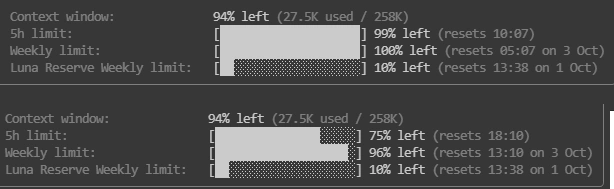
Empirical Proof: The Eight-Hour Forward Shift: This shifting behavior was documented in live telemetry by Gerry Burde on X. In the top panel of Figure 2, the weekly limit stands at 100 % remaining with an initial reset target of 05:07 on October 3rd. The context window shows 94 % remaining (27.5 k used of 258 k tokens). The 5-hour limit shows 99 % remaining, resetting at 10:07. The Luna Reserve shows 10 % remaining, resetting at 13:38 on October 1st.
In the bottom panel, the user consumes just 4 % of their weekly allocation. Weekly capacity drops to 96 % and the 5-hour limit falls to 75 %. Crucially, the weekly reset milestone shifts forward by eight hours and three minutes to 13:10 on October 3rd.
The “Weekend” Office Scenario & Banked Reset Evaporation: This activity-triggered mechanic is especially punitive for developers on standard 9-to-5 engineering schedules. Anyone who works standard business hours with their subscription plan gets completely disrupted by a reset landing on Friday or Saturday. If a user’s cycle ends on Friday afternoon and they log off until Monday morning, they forfeit two full days of potential allocation. Their new 7-day timer starts ticking only on Monday morning. That pushes their next reset all the way to the following Monday, perpetually trapping them behind an unrecoverable weekly cycle.
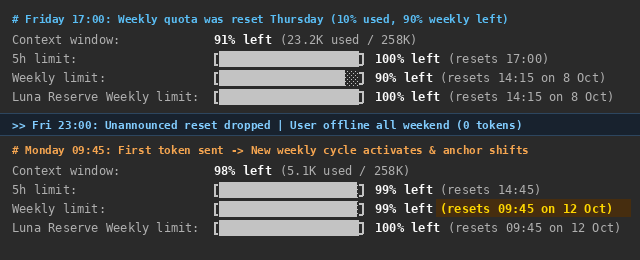
Consider an engineer whose weekly quota reset on Thursday at 14:15. By Friday at 17:00, they consumed only 10 % of their weekly limit, leaving 90 % of their weekly allowance remaining (top panel of Figure 3). Their weekly countdown was cleanly anchored to the following Thursday (14:15 on October 8th). On Friday night at 23:00, OpenAI distributed an unannounced, generous quota reset across the developer cluster. Because the engineer was offline for the weekend, they sent zero tokens across Saturday and Sunday.
Under OpenAI’s activity-triggered architecture, an unannounced reset does not start ticking until the subscriber consumes their first token. The engineer returned on Monday morning and dispatched their first prompt at 09:45 AM (bottom panel of Figure 3). This delayed activation triggered two compounding operational penalties. First, the 90 % of unused weekly quota was overwritten without rollover rather than added to the fresh allocation. Second, the new 7-day timer anchored to Monday at 09:45 AM (resets on October 12th), permanently shifting the sprint schedule forward by four days. The engineer gained zero extra compute from the Friday drop, lost 2.5 days of potential weekend capacity, and surrendered their mid-week reset cadence.
- Unpredictable Reset Times and Forward Creep: Because the timer anchors to when you initiate your first prompt of the new cycle, your reset time constantly creeps forward. It becomes impossible to rely on a consistent weekly schedule for sprints, code reviews, or scheduled batch jobs.
2. Reasoning Models: GPT-5.6 Sol and Hidden Thinking Quota Mechanics
OpenAI’s flagship reasoning models (such as GPT-5.6 Sol) introduce an invisible usage dynamic: hidden reasoning tokens.
How Reasoning Tokens Work in Subscriptions
When you submit a complex engineering prompt to Sol, the model produces two distinct sets of tokens: 1. Thinking Tokens: Internal chain-of-thought tokens where the model explores hypotheses, backtracks, and plans code structure. While hidden from UI output, these tokens consume your subscription reasoning quota. 2. Completion Tokens: The visible markdown response, code snippets, and explanations returned to you.
On complex refactoring tasks, a Sol model might generate 8,000 thinking tokens to produce 400 lines of Python code (approximately 1,200 visible tokens).
Quota Behavior Across Subscription Tiers
- On ChatGPT Plus ($20 / mo): Sol carries strict velocity and reasoning caps. Submitting two 1,000-line file audits can exhaust your primary weekly reasoning allowance, activating the dedicated Luna reserve. This fallback is strictly metered at roughly one 5-hour window of compute and cannot bypass short-term rolling velocity ceilings. If you exhaust your shared 5-hour rolling velocity budget, the system temporarily locks out regardless of remaining reserve. Once this finite reserve bucket is depleted, it remains dry until your weekly billing cycle resets (unless refreshed early by an engineering reset).
- On ChatGPT Pro ($100 / mo, Active Pro 5X): Provides a 5-fold expansion in Sol reasoning limits. Engineers can conduct multiple complex architectural explorations and deep code reviews each day without hitting early daily ceilings.
- On ChatGPT Pro ($200 / mo, Pro 20X): Grandfathered accounts command 20-fold reasoning headroom and access to Sol pro mode. The lockout cliff is not removed outright, because Codex still draws on a 5-hour allowance and a weekly allowance.
- On ChatGPT Team ($25 / user / mo): Message limits on Sol are elevated compared to Plus, allowing teams to handle multiple daily debugging sessions before hitting velocity limits.
3. Interactive Coding & Creative Sandboxes: Canvas, Codex, and Media Limits
OpenAI provides dedicated interfaces for software development and multimedia within ChatGPT subscriptions:
Canvas: Side-by-Side Code Editing
OpenAI’s coding interface, Canvas, creates an interactive workspace alongside your chat: - Targeted Surgical Refactoring: Highlight specific lines and prompt for focused changes, such as adding boundary checks or extracting error types. - Inline Code Reviews: Canvas generates inline comments and suggested edits that you can accept or decline with a click. - Where Canvas Hits Limits: Canvas operates on a single file at a time. It cannot inspect neighbor files, trace imports across a repository, or execute your local test suite.
Subscription Coding Allocations (Codex Seats)
In addition to web chat, OpenAI subscriptions provide bundled access to coding tools and Canvas: - Independent Usage Budgets: Subscriptions separate conversational messaging limits from coding tool and agent quotas. - Preserving Your Coding Quota: Burning coding tool quota on ambiguous requirements or exploratory debates exhausts your plan quickly. Keeping coding tools focused on concrete code changes ensures you stay within your monthly allowance.
Image Generation (DALL-E) vs. Google Flow and Zero Native Audio
Creative asset generation is another critical subscription value driver: - DALL-E 3 Image Generation: Included in Plus with an allowance of approximately 50 images per 3-hour window. Pro tiers ($100 and $200) significantly expand throughput, making it easy to generate UI mockups and article graphics without rate limiting. - Zero Native Video or Music Generation: Unlike Google’s ecosystem which bundles the Google Flow creative studio (Veo 3.1 cinematic video) and native MusicFX audio (powered by Lyria), OpenAI provides zero native video or audio generation. ChatGPT can compose lyrics, arrange chord charts, and generate MIDI or ABC text notation, but it cannot generate audio files or video clips. Subscribers requiring synthesized music or video facades must purchase separate subscriptions to third-party platforms such as Runway, Kling, Suno, or Udio.
4. Dual-Bucket Quota Arbitrage: Pre-planning and Post-Validation with Web GPT Pro
Within an OpenAI subscription, developers navigate two distinct compute buckets: web conversational reasoning and coding tool allowances.
The Structural Separation of Subscription Buckets
OpenAI separates web reasoning from coding tool allocations:
The Coding Tool Quota: This allowance covers Canvas sessions, Codex interactions, and seat-level coding allocations. Every request draws from a limited rolling allowance. Asking coding tools to explore open-ended architectures or debate design trade-offs rapidly depletes this quota.
The Web Subscription Bucket: A ChatGPT Pro subscription ($100 / mo active Pro 5X, or $200 / mo grandfathered Pro 20X) delivers extensive access to GPT Pro extended reasoning inside the browser. It operates on a flat monthly rate with no per-token charges.
Web Exclusivity of GPT Pro
High-compute GPT Pro extended reasoning is available only through the ChatGPT web interface.
You cannot invoke this maximum-compute reasoning mode inside external coding extensions or command-line wrappers. OpenAI reserves extended reasoning for the browser, where the model generates tens of thousands of hidden chain-of-thought tokens to evaluate complex problems.
By conducting upfront architectural design in the web interface, developers harness high-compute reasoning at a flat rate, protecting their subscription’s coding allowance for actual implementation.
The Pre-planning and Validation Sandwich
High-velocity engineering teams orchestrate this arbitrage through a three-stage workflow: the pre-planning and validation sandwich.
+-------------------------------------------------------------------------+
|                  STAGE 1: UPFRONT PRE-PLANNING (WEB UI)                 |
| - Platform: Web ChatGPT Pro ($100 / mo active or $200 / mo flat rate)   |
| - Engine: GPT Pro extended-compute reasoning (Sol Pro mode)             |
| - Tasks: System architecture, trade studies, schema design, task specs  |
| - Cost: $0 marginal token expense for deep cognitive exploration       |
+-------------------------------------------------------------------------+
                                    |
                                    v [Structured Implementation Blueprint]
+-------------------------------------------------------------------------+
|                 STAGE 2: MECHANICAL EXECUTION (CODING PLAN)             |
| - Platform: Coding tools and agents (Codex, Canvas, coding seats)       |
| - Engine: Fast execution models grounded on the provided blueprint      |
| - Tasks: Deterministic code edits, test loops, syntax migrations        |
| - Cost: Minimal coding quota burn; zero quota wasted on design debates  |
+-------------------------------------------------------------------------+
                                    |
                                    v [Git Diff & Test Suite Output]
+-------------------------------------------------------------------------+
|                  STAGE 3: POST-VALIDATION AUDIT (WEB UI)                |
| - Platform: Web ChatGPT Pro ($100 / mo active or $200 / mo flat rate)   |
| - Engine: GPT Pro extended-compute reasoning                            |
| - Tasks: Adversarial code review, spec conformance, edge-case triage   |
| - Cost: $0 marginal token expense for comprehensive verification        |
+-------------------------------------------------------------------------+
Step 1: Upfront Pre-planning and Architecture (Web GPT Pro)
Begin every complex engineering task in the ChatGPT web interface using GPT Pro.
Supply your project requirements, API specifications, and performance constraints. Allow the model to generate tens of thousands of hidden reasoning tokens across multiple minutes. In this phase, GPT Pro performs the heavy cognitive labor: - Evaluating architectural trade studies and modular system boundaries. - Designing resilient database schemas and strict type signatures. - Enumerating subtle failure modes, distributed race conditions, and edge cases. - Decomposing the epic into ordered, atomic implementation tasks.
Because this exploration draws from the flat-rate web subscription, it incurs $0 in marginal token costs. Exploring ambiguous architecture through a coding tool burns limited coding allowances before writing production code.
Step 2: Mechanical Execution (Coding Tools & Plan Budget)
Once web GPT Pro produces a deterministic, fully specified implementation blueprint, transfer the markdown specification to your local workspace.
Hand the structured plan to your coding environment (Codex CLI, Canvas, or dedicated agent seats).
The coding tool operates under strict guidance: - It focuses exclusively on implementing the planned steps deterministically. - It applies surgical file edits, runs linters, and executes local test suites. - It loops autonomously through compiler errors until test passes succeed.
Because the implementation plan is complete and unambiguous, the tool wastes zero coding quota exploring design alternatives. It operates purely as an efficient mechanical execution engine.
Step 3: Validation and Refinement (Web GPT Pro)
When the coding tool completes its code edits and local tests pass, export the resulting git diff and test reports.
Return to your web GPT Pro session to conduct the closing verification pass: - Specification Conformance: Verify that the implemented patch fulfills every architectural invariant defined in Step 1. - Adversarial Code Review: Inspect the diff for subtle resource leaks, missing boundary checks, or security vulnerabilities. - Complex Edge-Case Triage: If the coding tool encounters an intractable test failure, paste the diagnostic trace into GPT Pro to isolate the root cause.
This completes the sandwich. High-compute reasoning brackets the workflow, while economical subscription quotas execute the mechanical center.
Economic Leverage: Web Quota vs. Coding Plan Burn
The leverage of this dual-bucket pattern becomes evident when contrasting quota consumption on real-world engineering tasks:
Unplanned Coding Tool Workflow: An engineer asks their coding tool to both architect and implement a feature from ambiguous requirements. The agent burns scarce coding quota exploring designs, backtracking through failed prototypes, and generating extensive conversational rationale. Within a few tasks, the account hits its rolling coding quota lockout.
Dual-Bucket Arbitrage Workflow: You execute all architectural designs and validation audits inside web GPT Pro. The system generates hundreds of thousands of hidden thinking tokens at $0 marginal cost under your existing subscription. You then feed clean, deterministic tasks to your coding tool. The tool executes the edits cleanly in a single pass, preserving your coding quota for actual file changes.
By shifting exploratory reasoning to web GPT Pro and execution to coding workers, engineering teams capture deep reasoning capabilities without exhausting their coding allocations.
5. The Pragmatic Subscription & Seat Allocation Strategy
To extract maximum developer velocity without overspending, software teams structure their OpenAI subscriptions across practical seat tiers:
- Tier 1: Team Workspaces for Daily Development ($25 / seat /
month)
- Deployed across the technical team for day-to-day coding assistance, debugging, and documentation synthesis.
- Houses shared team GPTs grounded on internal engineering manuals, API references, and design patterns.
- Provides elevated message allowances and shared collaboration spaces over individual Plus seats.
- Tier 2: Targeted Web GPT Pro Seats ($100 / mo Active or $200
/ mo Grandfathered per Architect)
- Assigned selectively to technical leads and system architects responsible for system design and complex debugging.
- Harnesses extended-compute reasoning and Deep Research at a flat rate, eliminating quota anxiety during upfront planning.
- Produces detailed implementation blueprints and conducts closing adversarial reviews on code changes.
- Quota Discipline: Protecting the Coding Plan Budget
- Keep coding tools (Codex, Canvas, dedicated coding seats) focused strictly on mechanical implementation.
- Never burn scarce coding tool quotas on exploratory design chats or requirement clarification.
- Stay disciplined within fixed-rate subscription seats to deliver predictable monthly costs and maximum engineering throughput.